
Should You Run Your Own SaaS Google Ads?

Yes, you can run your own Google Ads, and for the first few months there is a good case that you should. Nobody knows your buyer, your pricing page or your sales call better than you, and the build is mostly that knowledge typed into Google. What founders rarely keep up is the part after launch: reading the search terms, adding negatives, clearing Google’s recommendations and checking the conversions are still real, every week, including the weeks you are fundraising or fixing an outage. So the deciding question is not skill. It is whether the account gets attention in the weeks you have none to give.
That is also why the interface feels hostile when you come back to it. A SaaS founder on r/PPC who returned to paid search after a few years away titled his thread “When did Google & Meta Ads become Unusable?”, and the answer is mostly that more doors are now left open by default. Closing them is part of the weekly job.
What doing it yourself actually involves
Running your own account is two jobs, and only the first one feels like work. The build happens once: conversion tracking, a few campaigns, keywords, ads and a budget. The upkeep happens every week for as long as the ads run, and that is where a do-it-yourself account usually falls over. Most founders who ask “can I do this myself?” are really asking about the build, and the honest answer to that is yes.
The upkeep is less glamorous. In the accounts we run, the weekly list looks like this:
- Read the search terms report and exclude anything a buyer would never type
- Check that conversions are still firing and still mean what they meant last week
- Work through the Recommendations page, applying what fits and dismissing what does not
- Look at spend against budget, and at which campaigns are limited by it
- Write down what changed and why, so next month you can tell cause from coincidence
None of it is hard. All of it is easy to skip, and skipping costs nothing you can see in the week you skip it. One founder on r/SaaS put the other side of it in a thread title: they changed PPC marketers several times and still ended up learning Google Ads themselves. Understanding your own account is not optional whoever runs it, which is why choosing between a freelancer and an agency comes after this question rather than instead of it.

Where Google’s defaults catch a founder out
The expensive mistakes in a do-it-yourself account are rarely bad decisions. They are defaults nobody decided on. Google’s own help pages, read on 29 October 2026, describe three that matter for a small B2B SaaS account, each reasonable for Google’s purposes and risky for yours.
First, match types. Google’s page on keyword matching options says broad match is the default match type all keywords are assigned, that it can show ads on searches that do not contain the direct meaning of your keywords, and that it is critical to use Smart Bidding with it. A SaaS with a handful of demo requests a month gives Smart Bidding very little to learn from, so how we run accounts is phrase match by default and exact for brand.
Second, recommendations that apply themselves. Google’s page on applying recommendations automatically lists what can be set to apply on its own, including adding broad match keywords, expanding to Google search partners and adjusting CPA targets. If someone ticked those during setup, changes arrive without anyone deciding them, and a quietly loosened target is one of the usual reasons a non-brand CPA keeps climbing.
Third, the search terms report is not the whole list. Google’s page on the search terms report says some terms without enough query activity are left out to meet its data privacy standards. A founder who reads it once, sees nothing alarming and stops looking is reading a partial picture.

What to keep doing yourself, even with help
Some parts of the account should stay with the founder whoever does the weekly work, because they depend on knowledge nobody outside the company has. Handing these over is how an account ends up technically tidy and commercially wrong.
The first is the definition of a conversion. Whether Google should chase trial signups, activated trials or booked demos is a business decision, and it changes everything the bidding does downstream; our piece on Google Ads for product-led and sales-led SaaS goes through how. The free conversion tracking planner turns that decision into primary and secondary goals you can create in Google Ads. The second is the offer and the landing page, because what the ad promises has to be true on the page, and only you can say what is true.
The third is feedback from sales. Google sees a form fill; you see which of those leads became a customer. Telling whoever runs the account which searches brought the people who paid is worth more than any bid change they will make that month. The fourth is ownership. Keep the Google Ads account under your own company’s login, so whoever helps can be added and removed without the account leaving with them.
When doing it yourself stops being the cheap option
Doing it yourself stays cheap for as long as your time costs less than the waste it prevents, and that stops being true sooner than most founders notice. The signs are habits rather than numbers, and you will spot them before any dashboard does.
The search terms report has gone unread for a month. Changes happen in a burst after a bad week, then nothing for weeks. A budget gets doubled because one campaign had a good fortnight, when how we run accounts is never more than double an account inside a month, because a bigger budget buys a wider set of auctions, not more of the same buyers. You open the account to check one thing and close it much later having changed several. And spend has grown to the point where a skipped week costs more than help would.
There is a floor below which none of this applies. Below about £1,000 a month of spend there is not enough data in a week to decide much, which is why our guide to what a SaaS PPC agency costs says to hire nobody at that level: paying anyone to manage it is paying for meetings about noise. Below that line, do it yourself, keep it simple and spend the effort on tracking, because until Google counts a real conversion nothing else is worth tuning yet.
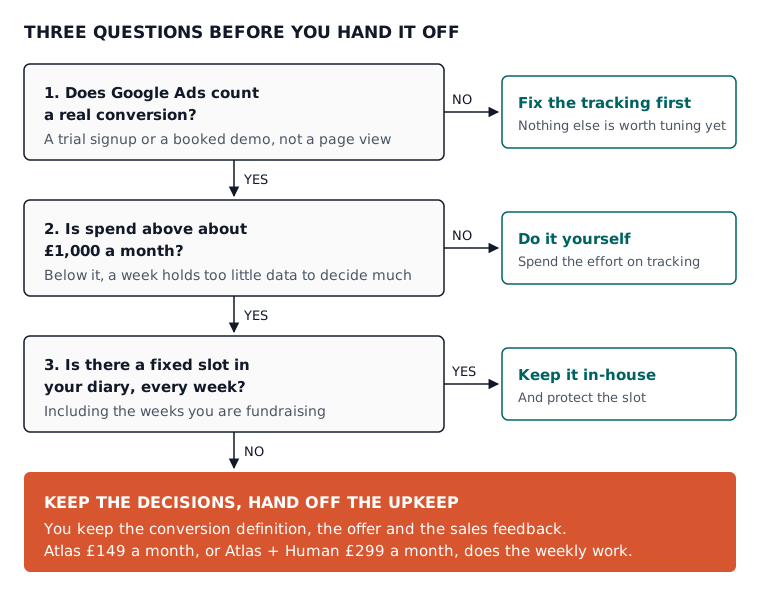
If help does make sense, the next question is what kind, and what an agency does that software cannot covers the agency or tool choice in full.

The middle ground between doing it yourself and an agency
The middle ground is to keep the decisions and hand off the upkeep. That is what we built Atlas for: an operator that connects to your Google Ads account, builds the campaigns and then does the weekly work inside limits you set. It is not an agency, and it is not a set of tools you still have to drive yourself.
On Google Ads, Atlas builds the account, conversion tracking, keywords and ads included, and creates campaigns paused, so nothing goes live until you have reviewed it. After launch it runs the weekly search term reviews, broad match sweeps, budget checks and waste detection. You pick the approval tier (manual, smart or full auto), every change passes safety rails that never block a converting search term, and you can undo any change within 30 days. Each change comes with its reason, which suits founders who want to keep learning their own account.
The prices are on our Google Ads for SaaS page: Atlas is £149 a month and applies weekly improvements with your approval, and Atlas + Human is £299 a month and adds a professional ads manager from our team who reviews every Atlas decision. The free plan covers conversion tracking setup and limited use of the tools, and Atlas does not run live ads on it. AI ads management for SaaS explains the approval tiers in more detail.
What to do on Monday
If your tracking cannot tell a trial from a customer, fix the tracking first. If you spend below the floor above, keep doing it yourself. If you spend more and can promise a fixed slot in your diary every week, keep it in-house too, and protect the slot. If neither is true, keep the conversion definition, the offer and the sales feedback, and hand the weekly upkeep to someone or something that turns up every week.
Whichever you pick, start by running last month’s search terms through the free search term analyser. If what comes back surprises you, that is your answer about how much attention the account has been getting. When you want Atlas to take on the weekly work, create a free Atlas account and set up conversion tracking first.
Questions people ask about this
- If I turn off auto-applied recommendations, can I see what Google already changed?
- Yes. Google says auto-apply works at account level only and can be switched on or off at any time in your auto-apply settings. The History tab on the Recommendations page summarises what was recently applied, and the Change History page lists each applied recommendation individually, so you can review or reverse them one by one.
- Does a 100% optimisation score mean my Google Ads account is profitable?
- No. Google describes optimisation score as an estimate of how well an account is set to perform, from 0 to 100 per cent, and says that applying or dismissing recommendations changes it. It is not used in Quality Score. It tells you how much of Google's advice you have dealt with, not whether a demo costs less than the customer it brings in.
- Is there a quicker way to read search terms than the full report?
- Where Google offers it, search terms insights group the searches your ads appeared on into themes and subthemes with key metrics for each, and fold in low-volume queries the report leaves out. Google says the theme labels come from the last 56 days of data, so a theme can include terms that no longer serve or that you have already excluded.
- Can I use the free tools without connecting my Google Ads account?
- Yes. Our Google Ads for SaaS page says each of Atlas's Google abilities, keyword generation, ad writing, search term analysis and conversion tracking planning, is also a free standalone tool you can run without signing up. A standalone tool gives you an answer; making the change in your own account is still your job.
- What does Atlas VIP add over Atlas + Human?
- Atlas VIP is £1,299 a month and includes everything in Atlas + Human, plus a monthly live strategy call, a monthly hands-on intervention session in which our team makes changes in your account rather than only reviewing them, advanced performance reporting and the fastest email and WhatsApp support.
