
Google Ads for PLG vs Sales-Led SaaS

Yes, your go-to-market changes how you should run Google Ads, though less in the keywords than in what you ask Google to find. A product-led SaaS with a free plan or free trial gets plenty of cheap signups, and the risk is teaching Smart Bidding to find people who sign up and never pay. A sales-led SaaS gets a handful of demo requests, and the risk is the opposite: too little data, and a sales team buried in leads that were never going to buy. The fix in both cases starts with the conversion you mark as primary, then the conversion window, then how wide you let the keywords go.
The four settings that change with your go-to-market
Four settings separate a product-led account from a sales-led one, and campaign types, ad formats and most of the keyword list can be identical. A founder who copies a sales-led playbook onto a freemium product, or the other way round, usually gets all four wrong at once. These are the four:
- The primary conversion, the event Google’s bidding works towards.
- The conversion window, how long Google waits after a click for that event to happen.
- Keyword breadth, how far past your exact terms you can afford to let Google roam.
- The number you judge it on, which is rarely the one Google reports by default.
The reason they differ is volume and distance. A product-led funnel produces lots of early events (signups) and fewer late ones (paying customers), often days or weeks apart. A sales-led funnel produces very few early events (demo requests), and the money arrives weeks or months later, through a person, away from your website. Google can only bid on what it is told about, inside the window it is told to wait.
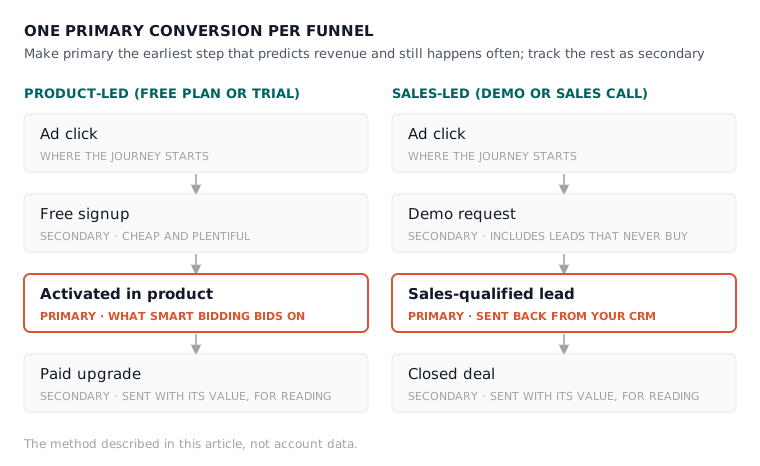
The rule we use in the accounts we run is the same for both models: make primary the earliest step that genuinely predicts revenue and still happens often enough to learn from. Everything before or after it is tracked as secondary, so you can read it without Google chasing it.

Product-led SaaS: stop bidding on signups that never pay
If you run a free plan or a free trial, stop making the free signup your primary conversion as soon as you can. Signups are cheap and plentiful, so Smart Bidding gets very good at finding people who like free things. Bid instead on an activation event, the moment a new user does the thing that predicts they will pay, and keep the signup as secondary.
What counts as activation is specific to your product: connecting a data source, inviting a teammate, publishing a first project, starting a trial that asks for a card. Pick the one your own data links to paying, not the one that sounds best in a board deck. Google’s page on conversion goals (read 27 October 2026) says that where several goals track different stages of the same funnel, you should set only one of them as the account-default goal. That is our rule in Google’s words: one stage drives the bidding, the rest are for reading.
The catch is volume. Activations happen less often than signups, and on a small budget there may not be enough of them each week for Smart Bidding to learn from. In the accounts we run, a new product-led account often starts with signups as primary and tight keywords, then moves the primary to activation once activations arrive steadily. Expect cost per conversion to rise when you make that move, because you are now counting fewer, better conversions. That rise is progress, a point we make at more length in why your non-brand CPA keeps climbing.
Trials that pay after the window closes
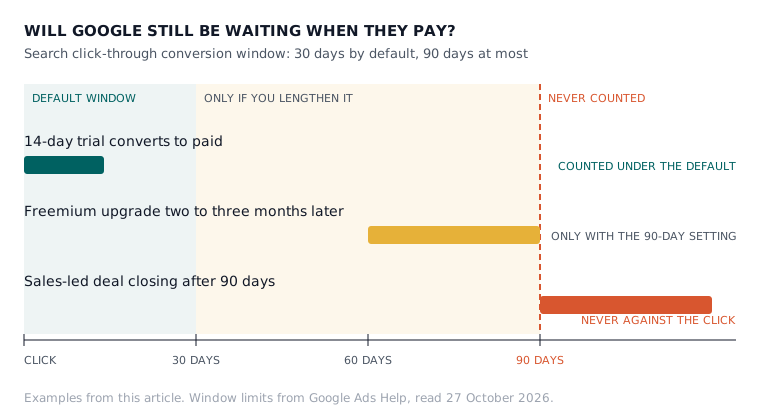
The second product-led trap is time. Google’s page on conversion windows (read 27 October 2026) says the click-through window defaults to 30 days for a new conversion action, and that for Search you can set it anywhere from 1 to 30, 60 or 90 days, depending on where the conversion comes from. A conversion that happens after the window closes is not recorded at all.
A 14-day trial that converts to paid fits inside the default with room to spare. A freemium user who upgrades two to three months later, which is exactly what one founder asked about on r/googleads, sits at the very edge of the 90-day maximum, and some will fall outside it. So on a freemium product, bid on activation, which happens in the first days, and send the paid upgrade as a secondary conversion with its value attached, so you can read it without making Google wait for it.
Trials that charge automatically raise the same problem from another side. The upgrade happens in your billing system, not on a thank-you page, so it has to reach Google from your server or as an import, never from a browser tag. The mechanics are their own job. Our free conversion tracking planner asks whether you are self-serve or sales-assisted, whether you offer a free trial and how long your sales cycle runs, then drafts primary and secondary goals from the answers.

Sales-led SaaS: feed Google the leads your sales team keeps
If buyers reach you through a demo or a sales call, the conversion that matters happens in your CRM, not on your website, so you have to send it back. Make a qualified stage primary, such as a sales-qualified lead or a first meeting that actually took place, and keep the raw demo request as secondary. Otherwise Google optimises for form fills, and form fills include students, job seekers, competitors and companies of three.
Google built a route for exactly this. Its page on offline conversion imports (read 27 October 2026) describes an ad that starts someone down a path ending in a sale at your office or over the phone, and recommends that anyone not already importing offline conversions start with enhanced conversions for leads. That version matches hashed details, such as the email address from your lead form, back to the ad, so your sales team’s verdict on a lead can reach the campaign that paid for it.
The window rule applies here too, and it bites harder. If your deals usually close after 90 days, a closed deal can never be counted against the click that started it. That is why the primary goes on a stage that lands inside the window, usually qualification, while closed-won goes in as secondary with its value, for reporting.
Keep the keywords narrow while the data is thin
A sales-led account sees few conversions a week, so it cannot afford to let Google wander. How we run accounts: phrase match by default, exact match for brand, and broad match only once a campaign has steady conversion data behind it. For a sales-led account that day comes later, and sometimes never, because the qualified-lead count stays small however well the account is run.
Product-led accounts can usually test broader terms sooner, because activation volume gives Smart Bidding more to judge by. Either way, the search terms report is where you find out what you actually bought, and our free search term analyser reads an export and flags the waste and the winners. Sales-led buyers also type intent words a self-serve buyer rarely does, such as “enterprise”, “SSO” or “for teams”, which matters most for companies that sell both ways.

Running product-led and sales-led together
Plenty of B2B SaaS companies sell both ways, with a self-serve plan for small teams and a sales-led contract for larger ones. Split campaigns by intent and give each the goal that fits it. Searches that suggest a quick start (“free”, “pricing”, “for small teams”) go to the signup page and bid on activation. Searches that suggest a buying committee (“enterprise”, “SSO”, “SOC 2”) go to the demo page and bid on qualified leads.
Google allows this. The same conversion goals page says goals you have not made account-default can still be used for bidding in specific campaigns. It also recommends pointing all campaigns at the same account-default goals so Google can learn across them, which makes a split a deliberate trade rather than a free lunch. We make it when the two funnels really are different products to the buyer, and we do not when “enterprise” is just a bigger seat count on the same plan.
Two habits matter more in a hybrid account than in either pure one. Budget moves slowly, because we never more than double an account inside a month, and in a split account that applies to each side on its own. And the weekly lever check reads both goals separately, since a blended cost per conversion across signups and qualified leads describes neither of them.
How to judge each model in your monthly report
Judge a product-led account on cost per activated user and cost per paying customer, read from your billing data rather than from Google. Judge a sales-led account on cost per qualified lead and on pipeline, read from your CRM. Cost per signup and cost per demo request are useful early warnings and poor verdicts.
That split shapes the report as well. A product-led report should show signup, activation and paid by campaign. A sales-led report should show the stages your sales team actually uses, by campaign, with the lag between click and qualified lead stated plainly, so nobody judges last week’s spend on deals that have not had time to happen. Our buyer’s checklist for what a SaaS PPC report should show covers the rest of the page.
Pick the conversion before you pick the keywords
On Monday, open your conversion actions before you open your keywords. Write down which one is primary, whether it is a step that predicts revenue, and whether it lands inside its window. If you are product-led and bidding on free signups with steady volume, plan the move to activation. If you are sales-led and bidding on raw demo requests, start sending qualified stages back from your CRM. If you are both, split by intent and give each campaign its own goal.
Atlas does this on Google Ads. It plans your conversion tracking from four questions about your sales model and builds campaigns in your account, paused for your review. From the Atlas plan at £149 a month it applies weekly improvements at the approval tier you choose, and you can undo anything within 30 days (how Atlas runs Google Ads for SaaS). Starting costs nothing, and the free plan covers the conversion tracking setup this article keeps coming back to: set up your free Atlas account.
Questions people ask about this
- If I lengthen my conversion window now, will older conversions be counted?
- No. Google applies a changed window only to conversions recorded from the day you change it, and it does not go back and count a conversion that fell outside the old window. So set the window when you create the conversion action, or change it early, before you start relying on its numbers.
- Will a longer conversion window show which keywords start the journey?
- It helps. Google says a longer window lets you find keywords early in the path to a conversion in Attribution reports, which show assisted conversions for 30, 60 and 90 day windows. Choose the window from the time lag report, which shows how long people take between the ad interaction and the conversion.
- Do I need a developer to send CRM stages back to Google Ads?
- Usually someone technical, at least once. Your lead form has to capture an email address, and your CRM has to send stage changes back to Google. Google says that from 15 June 2026, offline conversion and enhanced conversions for leads uploads move to its Data Manager API and are blocked in the Google Ads API, so check any older integration still works.
- Does Atlas work for a sales-led SaaS as well as a product-led one?
- Yes, on Google Ads. Atlas plans conversion tracking from your sales model, self-serve or sales-assisted, with primary and secondary goals to match, and creates the conversion actions in your Google Ads account through the API. It builds campaigns paused for your review, and you choose the approval tier for every change after that.
- Can Atlas run my Google Ads on the free plan?
- No. The free plan is self-serve: full conversion tracking setup for Google and Facebook, limited use of the other 8 Atlas tools, and email support. Atlas does not run live ads on it. Weekly improvements to a live Google Ads account, applied with your approval, start on the Atlas plan at £149 a month.
