
Who Really Runs Your SaaS Ads Account

The short version
- The person who pitches you is often not the person who works in your account. That is how most agencies are staffed, and it only becomes a problem when nobody senior checks the work and the junior keeps changing.
- You do not have to take anyone’s word for it. Google Ads change history shows the email address of whoever made each change, and an admin can see every user’s last login time.
- Before you sign, ask who will be in the account each week, how many other accounts they handle and what happens when they leave. Put the answers in the contract.
- Keep admin access yourself and give the person doing the work their own login, so every change has a name on it.
- Atlas + Human is the other route: Atlas does the weekly work and a professional checks every decision it makes.
Often, no. The senior person on the sales call sets the strategy and someone more junior does the weekly work. That is not a scandal on its own: a capable junior with a senior reviewing their work every week will run a B2B SaaS account better than a distracted director. What goes wrong is the version where the senior disappears after onboarding, the junior has too many accounts to read your search terms, and the junior changes every few months. You can see which version you have bought from your own Google Ads login, without asking anyone.
Why the person who pitched you is rarely the person in your account
Agencies are built so that their most experienced people sell, plan and supervise, while less experienced people carry out the day-to-day work. That is how the numbers add up at a monthly fee a SaaS company can pay, and most agencies will say so if you ask directly. The question is never whether a junior is involved. It is how much senior time your account gets once the contract is signed.
The searches that reach this site put the worry plainly: hands-on SaaS PPC agencies, senior operators rather than junior account managers, agencies with no junior churn. Those are three different fears. Hands-on is about hours in the account, senior is about judgement, and churn is about continuity. Churn is the expensive one, because every new account manager spends their first weeks relearning what the last one knew about your buyers, your negatives and your sales cycle.
How we run accounts shows why. We never more than double an account inside a month, we default to phrase match and keep exact match for brand, and somebody reads the search term report every week. Each is a habit, and a habit survives a handover only if someone wrote down why. When the person changes and the notes do not exist, the account tends to drift back towards broad match and budget edits.

How to see who actually works in your account
Your own Google Ads account already records who does the work. Google’s change history lists the changes made to your account, campaigns and ad groups over the past two years, and its User column shows the email address of the person who made each change through the Google Ads interface (read 8 October 2026). Changes made through the Google Ads API, by a third-party tool for instance, may show as Google Ads API or the tool’s own name.
Open Change history from the Campaigns menu, set the range to the last eight weeks and read the User column. Three patterns tell you most of what you need:
- One name, most weeks, adding negatives, adjusting keywords and rewriting ads. Someone is working the account, and now you know who.
- A name you have never met, doing all of it. That can be fine, but that is the person you should be talking to, not only the one on the monthly call.
- A new name every month, or long gaps. That is churn or neglect, and it shows here well before it shows in a report.
The login check
The second check needs admin access. Google’s page on access levels says an admin can review each user’s authentication method and last login time (read 8 October 2026). If the account manager named in your contract has not logged in for three weeks, the login page and the change history will agree with each other, and neither will agree with a report that says the account is being actively optimised. While you are in there, export your search terms and run them through our free search term analyser: an unread report is the quickest sign that nobody senior is looking.
One caveat if your agency works through a manager account: the same Google page says that once you accept the link, users with admin access to that manager account can manage your campaigns. That is normal, but the list of who can touch your account then sits at the agency, so ask to see it.
Questions to ask before you sign
Ask these on the sales call and write the answers down, because they become the contract terms in the next section. A good agency answers them all without hesitating, and a vague answer to the first tells you most of what you need.
- Who, by name, will be in our Google Ads account each week, and can we speak to them before we sign?
- How many other accounts does that person look after, and how many hours a month is ours budgeted for?
- Who reviews their work, how often, and will that reviewer ever work in our account themselves?
- How long has that person been with you, and what happened the last time a client’s account manager left?
- When someone changes, what is written down for the next person, and do we meet them first?
Founders skip the question about hours because it feels rude. It is not: an agency prices your account by the time it expects to spend, so the number already exists. Whether it suits you depends on your spend and how much changes from week to week, and our piece on what a SaaS PPC agency costs puts the published fees next to real budgets.

What hands-on should mean in the contract
Hands-on means nothing in a contract until it says who, how often, and what happens when that changes. Four clauses do most of the work, and none is unusual enough for a decent agency to refuse.
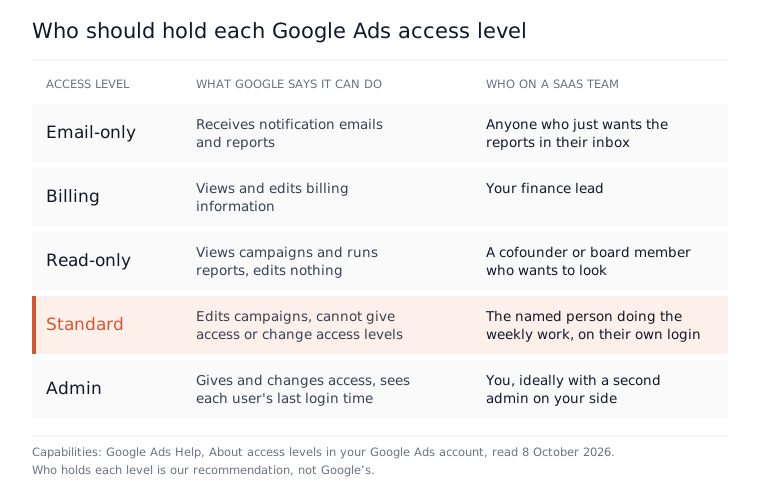
The first is a named operator: the person who will work in the account, with a promise to tell you in writing before they are replaced and to introduce whoever replaces them. The second is a rhythm you can check, meaning weekly changes visible in change history under that person’s own login rather than a shared agency address. The third is access that stays yours. You remain an admin, ideally with a second admin on your side, which Google’s own page suggests for keeping tag management running if one person becomes unavailable. The agency gets Standard access, which in Google’s table can edit campaigns but cannot give anyone access or change access levels. The fourth is an exit that does not rely on goodwill: if the named person leaves and the replacement does not suit you, you can give notice without waiting out the term.
Who else gets which access level
Google Ads has five access levels, and everyone else on your side should get the lowest one that does their job. Read-only lets a cofounder or board member look at campaigns and run reports without editing anything, Billing covers your finance lead, and Email-only suits anyone who just wants the reports in their inbox.
If you are already mid-contract, read whether your SaaS PPC agency is working before deciding, and our guide to switching SaaS PPC agencies before you send notice. Still choosing? Our shortlist of SaaS PPC agencies is a place to start the calls.

Where Atlas fits if you want the work done and checked
Atlas answers the same worry a different way. It is an operator rather than an assistant: Atlas connects to your own Google Ads account, builds the campaigns, then does the weekly work on search terms, negatives, keywords, ads and budgets at the approval tier you choose, manual, smart or full auto. Every change passes safety rails before it reaches your account, you can undo any Google change for 30 days, and Atlas writes down the reason for each one, so the question of who did what never comes up.
The Atlas plans map onto this question. Atlas at £149 a month does the weekly Google Ads work, applied with your approval at the tier you set. Atlas + Human at £299 a month adds a professional ads manager from our team who monitors your live stream of Atlas optimisations and approves, adjusts or corrects each decision. Atlas VIP at £1,299 a month adds a monthly strategy call and hands-on work in your account. Meta is a different job: Atlas builds the campaigns and gives you weekly tools you run yourself, because there is no Meta Marketing API integration. The free plan sets up conversion tracking, and Atlas does not run live ads on it. The guide to Google Ads for SaaS covers running the account itself.
Tonight’s five-minute check
Open change history and read the User column for the last eight weeks. If you already have an agency, you will know within five minutes whether one person is working the account, several are taking turns, or nobody has been in it lately. If you are about to hire one, take the five questions into the call and the four clauses into the contract, and keep the admin login on your side of the table.
If what you want is the weekly work done, a professional checking it and a log you can read, start a free Atlas account and set up your conversion tracking first.
Questions people ask about this
- Can an agency lock me out of my own Google Ads account?
- Only if it holds the power to. Google says an admin can give access, change access levels and cancel other users' invitations, and that where a linked manager account has ownership, that manager account's admins can edit user access in your account too. Keep at least one admin login on your side, ideally two.
- Why does my change history show changes from Google Ads system?
- Google says changes made by automated systems or its internal systems may appear under users such as Google Ads system, and that these are typically maintenance or auto-generated targets which usually do not alter active campaign settings. It also says some changes made by Google representatives during consultations may not be listed at all.
- Does Atlas + Human include building the account by hand?
- No. On Atlas + Human, a professional ads manager from our team oversees every Atlas move and approves, adjusts or corrects each decision. Account building and live interventions are part of Atlas VIP at £1,299 a month, which adds a monthly hands-on session where our team makes the changes in your account, plus a monthly strategy call.
- What happens to my campaigns if I stop using Atlas?
- They stay where they are. Everything Atlas builds lives inside your own Google Ads and Meta Ads Manager accounts, in your name: campaigns, audiences, conversion tracking, negative lists and ad copy. There is no proprietary layer to migrate. You lose the weekly Atlas work from that point on, and nothing else.
- What support comes with each Atlas plan?
- The free plan comes with email support. Atlas at £149 a month adds WhatsApp alongside email, Atlas + Human at £299 a month gets priority email and WhatsApp support, and Atlas VIP at £1,299 a month gets the fastest email and WhatsApp support of the four plans.
