
How to Switch SaaS PPC Agencies

Switching PPC agencies is mostly an admin job, and it goes wrong for admin reasons. If you own your Google Ads account, hold admin access yourself and pay Google directly, the handover is an afternoon of unlinking and re-inviting. If the agency created the account inside their own manager account, holds the only admin login and pays the invoice, you are negotiating rather than leaving. Sort out those three things before you send the email and everything after it is scheduling.
Check who owns the account before you give notice
Open Google Ads, click the Admin icon, then Access and security, and read two tabs: Users, for who holds admin access, and Managers, for which manager accounts are linked and which one is marked as owner. Those two screens decide how your next month goes, and they take about five minutes to read.
Google is precise about what each level can do. Admin is the only access level that can grant account access, accept or reject manager link requests, unlink a manager account, or add and remove product links (Google Ads Help, read 24 September 2026). Standard access can edit campaigns all day and can do none of that. If the only admin on the account is someone with an agency email address, you do not control your advertising, whatever the contract says.
Ownership is the part founders miss. A manager account that creates a new Google Ads account automatically becomes its owner, while a manager that links an account you already had gets no ownership unless you switch it on yourself (Google Ads Help, read 24 September 2026). The good news is that ownership is not the same as owning the data: Google states that owners do not take data ownership or administrative rights away from the client account, and that the client can remove ownership access by unlinking.
What stays in the account when the agency leaves, and what stops
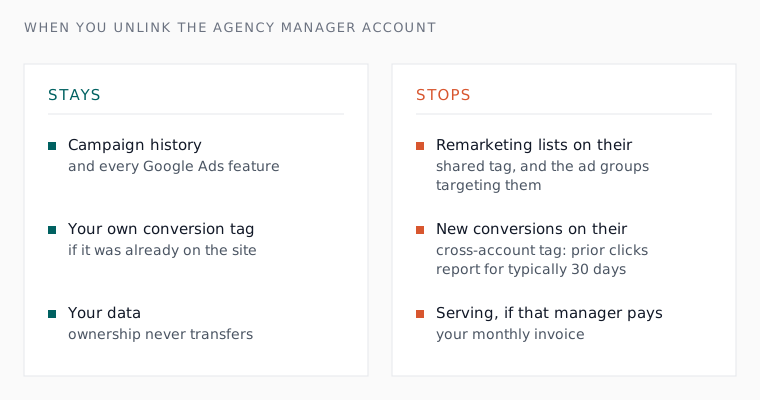
The history stays. Google’s page on unlinking says an individual Google Ads account can unlink from a manager account without losing its own campaign history or access to any Google Ads features (read 24 September 2026). Two years of conversion data, auction history and bidding signal sit in the account, not in the agency, and that is the single most reassuring fact in this whole process.
Three things do leave with them, and each is worth an email before the last day rather than after it. Remarketing lists built on the manager account’s shared tag stop populating, the account loses access to the manager’s shared lists, and any ad group targeting those lists or campaign excluding them stops running. Cross-account conversion tracking behaves similarly: the manager’s tag stops recording conversions for clicks after the unlink, keeps reporting on earlier clicks for the length of the conversion window, typically 30 days, and your own tag resumes only if it was already installed on the site.
Billing is the one that actually turns the ads off. If you are on monthly invoicing and the agency’s manager account is the paying manager, Google’s wording is that the account will stop serving after you unlink it, and the billing setup has to be changed before the unlink rather than afterwards.

The handover list worth putting in writing
Ask for all of it in one email, with a date, before the notice period starts. Most agencies hand it over without fuss, because most agencies are fine and the relationship simply stopped fitting. The ones that stall are telling you something useful about the last twelve months.
- Admin access for two named people at your company, on your own email addresses.
- The Google Ads customer ID, plus confirmation of which manager accounts are linked and which one is owner.
- Every conversion action, what fires it, and whether it comes from your own tag, from Analytics, or from their manager account’s cross-account tag.
- Admin access to the Google Tag Manager container and the Analytics property, in your company’s name.
- The negative keyword lists in use, and whether any of them live in the agency’s manager account rather than yours.
- The audiences and customer lists, and who uploaded them.
- The change history, and more useful than any of it, a written note of what was tried and what failed.
Two named admins matters more than it sounds. Google warns that an account with only one administrator can lose access to its tags if that person becomes unavailable, and an agency you have just given notice to is, in practice, a person becoming unavailable. Our conversion tracking planner is a free way to write down what should be firing before you find out what is.

Time the switch so nothing stops serving
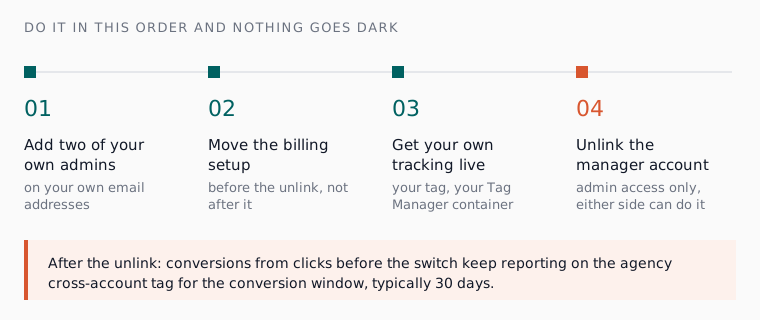
Add your own admins, move the billing, get your own conversion tracking live, then unlink. That order is the whole trick. Unlinking first is the version that ends in a Monday morning of paused campaigns, an unreachable account manager and a support queue.
Use the notice period as a handover rather than a wind-down. Book one call with the person who actually worked in the account rather than the account manager, and ask for the reasoning behind the structure: why those match types, why those negatives, what was tested and quietly dropped. Either side can perform the unlink itself, as long as the account still has at least one user with access, so there is no drama in the final step if the earlier ones are done.
Expect your reporting to look strange for a month. Conversions from clicks that happened before the switch keep landing on the old cross-account tag for the conversion window, so the first four weeks under new management will read oddly unless you are expecting it.

What the first 90 days should look like, whoever takes over
The temptation for anyone inheriting an account is to rebuild it in week one, which throws away the only thing you kept. We never more than double an account inside a month: change the structure faster than that and smart bidding is relearning from scratch while you lose any ability to say which change did what. Phrase match by default and exact for brand, one lever at a time, checked weekly.
Ask for the same three numbers every week: non-brand cost per acquisition, the share of spend going to search terms nobody would call qualified, and how many conversion actions are still firing. If a new team cannot produce those in week two, you have swapped one dashboard for another. The free search term analyser will give you the second number yourself while you decide.
If you are leaving because the fee stopped matching the work, do the arithmetic before you sign the next one. We set out what a SaaS PPC agency actually charges, and our shortlist of agencies worth talking to covers who does this well for B2B software.
Where Atlas fits if you are not hiring a replacement
Plenty of teams leave an agency and do not want another one, they want the work done without the retainer. That is what Atlas does: it connects to your own Google Ads account, builds the campaigns in hours, then runs the weekly work, search term reviews, waste checks and budget checks, at the approval tier you set. Campaigns are always created paused, every change passes the safety rails first, and anything can be undone within 30 days.
The ownership question mostly answers itself in that model, because the account is yours and stays yours. Atlas works inside it rather than alongside it in someone else’s manager account, and the weekly changes are applied at the tier you chose rather than the one you were told about. Pricing is published: £149 a month for Atlas, and £299 a month for Atlas + Human, where a professional ads manager reviews every decision Atlas makes. There is more detail on how Google Ads works for B2B SaaS and on what an AI ads manager does day to day.
Own the account first, then choose who runs it
The decision you are really making is not which agency comes next, it is whether you hold the keys to your own advertising. Do the two-tab check this week, put two of your own people on admin, move the billing into your name, and who runs the account becomes a normal commercial choice you can revisit twice a year without fear of losing anything.
An agency that makes that hard has already answered the question for you. One that hands it all over in a day has earned the reference you give them, which is worth remembering when the next founder asks.
If you would rather not hire a replacement at all, you can start a free Atlas account and get your conversion tracking straight before you decide anything else.
Questions people ask about this
- Can our agency lock us out of our own Google Ads account?
- Only if they hold the only admin access. Google's rules let a manager account unlink a client at any time, and admins on an owner manager account can remove users from your account and revoke administrative access. Two admins on your own email addresses closes that door before it matters.
- Who can switch a manager account's ownership off?
- An admin on the owner manager account can turn ownership off or transfer it, and your account must have at least one admin user for that to complete. Users on the client account cannot turn ownership off themselves, but they can always unlink a manager that has it (Google Ads Help, read 24 September 2026).
- Can we move the account to our own manager account afterwards?
- Yes. Google's guidance is that once unlinked, the account can be linked to a new manager account, and you can then turn ownership on for a different manager. Setting up your own manager account before you leave is worth doing first, because it gives the next team somewhere to be invited into.
- Should we run the old and the new team in parallel for a month?
- Rarely worth it inside one account. Two teams changing bids and negatives in the same campaigns makes every result unattributable. Overlap the reporting rather than the work: leave the outgoing team on read only access for a month so they can answer questions, and give the incoming one the admin access and the decisions.
- Do we need to tell Google we have changed agency?
- No, unlinking the manager account is the whole of it. The one thing that can need Google directly is the payments profile: Google Ads users cannot add or remove payments profile users themselves, so the request has to go through Google Ads support (Google Ads Help, read 24 September 2026).
