
Read a Search Term Report in Ten Minutes

A search term report is the list of real searches that triggered your ads, and on a B2B SaaS account reading it well takes about ten minutes a week. Sort by cost and block the searches from people who will never buy. Sort by conversions and turn the searches that already work into keywords of their own. Then check where each match came from, because since AI Max a growing share of those searches did not come from your keyword list at all.
That is the whole job. The hard part is not the reading, it is knowing what you are looking for and doing it every week rather than when the bill frightens you. A founder on r/googleads described the usual version: cost running away, almost nothing to show for it, and a report full of searches nobody in their market would type. The routine below is how we would read that report.
Set the report up once so it reads fast
Open Campaigns, then Insights and reports, then Search terms, set the date range to the last 30 days and add two columns Google hides by default. Do it once and save the column set. Every later read then starts from the same view, which is most of what turns an hour of scrolling into ten minutes.
Google’s own search terms report page, read 12 November 2026, says the Keyword column, which shows which of your keywords matched each search, does not show by default. Turn it on under Columns, then Attributes. Without it you can see that a search was bad but not which keyword let it in, and the keyword is the thing you actually fix. If AI Max is on in any campaign, add the Source column too: Google’s AI Max reporting page, read the same day, tells you to add it to the default view.
The columns worth keeping on screen for a SaaS account are short:
- Search term, Keyword, Match type and Source
- Cost, Clicks and Conversions
- Cost per conversion, where the conversion is the trial or demo you actually count
Thirty days rather than seven is deliberate. An account spending a few thousand pounds a month gets too few clicks per search in a week to tell bad luck from a bad search. A month gives each term long enough to show what it is.

The ten minutes, in four passes
Read the report in four passes, each sorted by a different column: cost to find the waste, conversions to find the winners, match type to find the keyword letting junk in, and source to see what Google added on its own. Each pass asks one question, so you never reread a row with a different worry in mind.
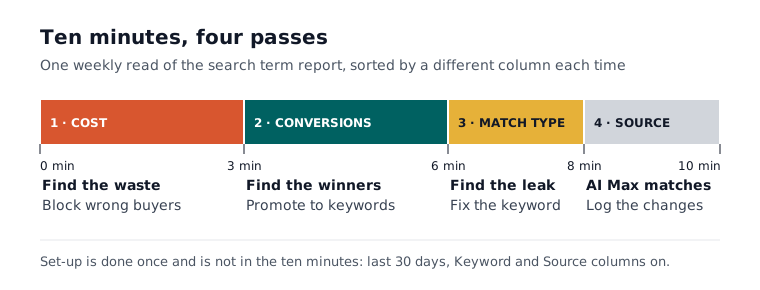
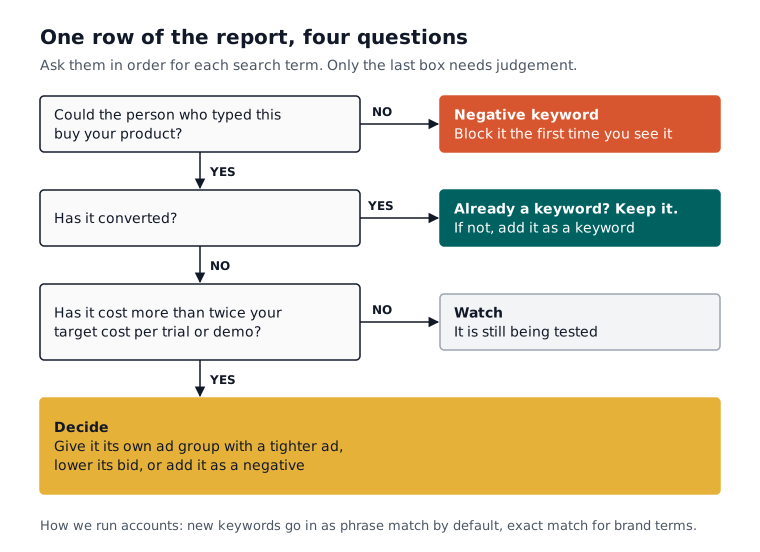
Pass one, cost (minutes 0 to 3). Sort by cost, highest first, and read down until the spend stops mattering. For each row ask one thing: could the person who typed this buy our product? Most of what you block in a week comes from this pass.
Pass two, conversions (minutes 3 to 6). Sort by conversions. A search that converted and is not already a keyword is the best free research you will get this week, so add it as a keyword in its own right. How we run accounts: phrase match by default, exact for brand terms.
Pass three, match type (minutes 6 to 8). Look for the keyword letting bad searches in. Google’s report page notes that the match type shown is how the search matched, not the type you set, so a broad keyword can appear as an exact match. If one broad keyword keeps turning up beside junk, fix that keyword rather than writing fifty negatives around it.
Pass four, source (minutes 8 to 10). If AI Max is on, filter for it and read what Google found without your keywords (more on that below). Then write one line on what you changed, so next week you know what to check first.
What a wasted search term costs you
Measure a wasted search in your own numbers, not in someone else’s industry average. A search that has cost more than your target cost per trial or demo and produced nothing has already spent a customer’s worth of budget. That is the line we use: below it a relevant term is still being tested, and above it the term needs a reason to stay.
Irrelevant searches do not need the threshold at all. Someone searching for jobs at a CRM company will not start a trial however long you wait, so block it the first time you see it. The threshold is for the searches that look right and are not yet converting. We watch those until they have cost twice your target cost per trial or demo, then decide: give the term its own ad group with a tighter ad, lower its bid, or add it as a negative.
The cost you cannot see on the row is that a wrong search is wrong every week until someone blocks it. Left alone across dozens of terms, that drift is one of the usual reasons a non-brand CPA keeps climbing with no visible change in the account.
The searches a SaaS account nearly always blocks
Some searches look relevant to Google and are useless to a B2B SaaS, and they turn up in almost every account we open. Most come from people looking for something other than software to buy: a job, a free version, a login page or a definition for a course. Block them at the word level in a shared negative list.
The usual suspects, by intent:
- Job seekers: jobs, careers, salary, hiring, internship.
- Free hunters: free, open source, crack, download, when you have no free plan.
- Existing customers: your brand name with login, sign in, support or cancel.
- Learners: what is, definition, course, certification, examples.
- Wrong meaning: the same word in another trade, such as pipeline for a sales tool matching searches from the oil and gas industry.
Be careful with “free” if your product has a free plan or a free trial, because for a product-led SaaS it can be among the best searches in the account. The difference is covered in Google Ads for PLG versus sales-led SaaS. If the report is the symptom of a messier account, what a SaaS Google Ads audit covers sets out the order to fix things in.

Adding negatives without blocking good traffic
Add each negative at the narrowest match that does the job, because negatives do not behave like keywords. Google’s negative keywords page, read 12 November 2026, says a broad negative blocks a search containing all its words in any order, a phrase negative blocks them in the same order, and an exact negative blocks only that search with nothing added.
In practice a single word such as jobs works as a broad negative, because any search containing it is wrong. Two-word ideas, where one word alone would block good traffic, belong in phrase match. Exact negatives are rarely worth the effort in a SaaS account, because the junk arrives in endless small variations and an exact negative catches only one of them. Before adding any negative, search your converted terms for that word: one careless negative can switch off the searches paying for the account.
That last check is the rule Atlas never breaks. When Atlas adds negatives from your search terms each week, it does not block a search term that has converted, it limits how many negatives it adds in a day, and you choose whether each change waits for your approval or applies inside those rails.
What AI Max adds to the report
If AI Max is on, the report now separates the searches your keywords caught from the ones Google found itself. Google’s AI Max reporting page, read 12 November 2026, describes an AI Max match type, a Source column and a Search terms and ad combinations view that shows each search beside the headlines and landing pages it was served with.
Google’s page on how AI Max works, read the same day, says the Source column shows whether a match came from broad match expansion or keywordless matching. PPC Land reported on 25 October 2026 that the combinations view in at least one live account now carries four source columns: search term match source, landing page source, headline source and description source. When we read Google’s page on 12 November it still described the view without naming them, so check your own account before you rely on them.
The source changes the fix. A bad search from your own keyword is a keyword or negative problem. A bad search from keywordless matching is a page problem, and the campaign-level URL exclusions on the same Google page are how you keep AI Max from sending clicks to your careers or documentation pages. Our longer piece on what AI Max changes for a SaaS account covers when to turn parts of it off.

Monday morning, ten minutes
Put the report in the diary for the same ten minutes every week, and do the four passes in order. Thirty days of data, the Keyword and Source columns on, block the wrong buyers on sight, promote the converters, and write down what you changed. If you want a second pair of eyes on the cost pass, paste the export into our free search term analyser, which sorts it by impressions, clicks and cost in your browser.
If you would rather it simply happened, this is the weekly job Atlas does on Google Ads. Atlas reviews your search terms and updates your negatives every week at the approval tier you set (manual, smart or full auto), and you can undo any change within 30 days. Atlas costs £149 a month, and AI ads management for SaaS shows how the tiers work. For the wider set-up, start from Google Ads for SaaS.
You can open a free Atlas account to set up conversion tracking and try the tools first; Atlas does not run live ads on the free tier.
Questions people ask about this
- Why does the search terms report not show every search I paid for?
- Google's search terms report page, read 12 November 2026, says the report lists search terms used by a significant number of people that triggered impressions and clicks. Rarer searches are left out of the named rows, which is one more reason to read a month at a time on a smaller account rather than a single week.
- Can I add a negative keyword straight from the search terms report?
- Yes. Google's AI Max reporting page, read 12 November 2026, says you can tick the box next to a search term or landing page and choose Add as negative keyword or Add as negative URL. Google's main report page adds that the Report editor version of the same data does not let you add keywords or negatives directly.
- Do I need to add plurals and misspellings as separate negatives?
- Plurals and synonyms, yes. Google's negative keywords page, read 12 November 2026, says negative match types work differently from keywords and you need to add synonyms and singular or plural versions yourself. It also says negatives account for casing and misspellings automatically, so those do not need adding.
- Why do some search terms look long or oddly formatted?
- They are often from Search partners. Google's search terms report page, read 12 November 2026, says ads on Search partner sites can appear on directory pages and other pages related to a search, and those search terms may look longer than normal or be formatted differently. Segment the report by network to see them separately.
- Why does filtering for AI Max show fewer search terms than I expected?
- Google's AI Max reporting page, read 12 November 2026, says filtering the Match type column for AI Max may show lower numbers, because the filter does not include the Other search terms row. Use the AI Max total rows at the bottom of the keywords report for the campaign-level figure instead.
